/* 01 - setSize, setDefaultCloseOperation, ImageIcon, Container, setBackground, setTitle, setVisible */
//Main.java
import java.awt.Color;
import java.awt.Container;
import javax.swing.ImageIcon;
import javax.swing.JFrame;
import javax.swing.text.AbstractDocument.Content;
public class Main{
// flwo - jframe > visibility > setsize > setTitle > imageIcon > backgoround color
public static void main(String[] args) {
Myjava mj = new Myjava();
}
}
/* 01 - setSize, setDefaultCloseOperation, ImageIcon, Container, setBackground, setTitle, setVisible */
//Main.java
import java.awt.Color;
import java.awt.Container;
import javax.swing.ImageIcon;
import javax.swing.JFrame;
import javax.swing.text.AbstractDocument.Content;
public class Main{
// flwo - jframe > visibility > setsize > setTitle > imageIcon > backgoround color
public static void main(String[] args) {
Myjava mj = new Myjava();
}
}
//Myjava.java import javax.swing.ImageIcon; import javax.swing.JFrame; import java.awt.*; public class Myjava extends JFrame{ public Myjava(){ this.setSize(420,420); this.setDefaultCloseOperation(JFrame.EXIT_ON_CLOSE); this.setResizable(false); // Get the current working directory and construct the image path String userDir = System.getProperty("user.dir"); String imagePath = userDir + "/a2.png"; ImageIcon image = new ImageIcon(imagePath); this.setIconImage(icon.getImage());// this title image Container c = this.getContentPane(); //Color color1 = new Color (200,100,0); // user defined //Color color1 = new Color (0x000000); // user defined c.setBackground(Color.CYAN); this.setTitle("sexy Bodypad"); this.setVisible(true); } }
 /* 02 - setlabel, debug image properly , ImageIcon dimension with image, ContainerPane BG color */
import javax.swing.ImageIcon;
import javax.swing.JFrame;
import javax.swing.JLabel;
import java.awt.Container;
public class Main {
public static void main(String[] args) {
// Create label
JLabel label = new JLabel("Book, do you read?");
// Get the current working directory and construct the image path
String userDir = System.getProperty("user.dir");
String imagePath = userDir + "/a2.png";
// Create ImageIcon
ImageIcon image = new ImageIcon(imagePath);
// Check if the image was successfully loaded
if (image.getIconWidth() == -1) {
System.out.println("Image not found or could not be loaded: " + imagePath);
} else {
label.setIcon(image);
}
// Adjust the label size to fit the text and the image
label.setBounds(10, 10, image.getIconWidth(), image.getIconHeight() + 20); // 20 is added for the text height
// Create frame
JFrame frame = new JFrame();
frame.setSize(420, 420);
// Get the content pane and set layout
Container c = frame.getContentPane();
c.setLayout(null);
// Add label to the content pane
c.add(label);
// Set frame properties
frame.setDefaultCloseOperation(JFrame.EXIT_ON_CLOSE);
frame.setTitle("Sexy BodyPad");
frame.setVisible(true);
}
}
/* 02 - setlabel, debug image properly , ImageIcon dimension with image, ContainerPane BG color */
import javax.swing.ImageIcon;
import javax.swing.JFrame;
import javax.swing.JLabel;
import java.awt.Container;
public class Main {
public static void main(String[] args) {
// Create label
JLabel label = new JLabel("Book, do you read?");
// Get the current working directory and construct the image path
String userDir = System.getProperty("user.dir");
String imagePath = userDir + "/a2.png";
// Create ImageIcon
ImageIcon image = new ImageIcon(imagePath);
// Check if the image was successfully loaded
if (image.getIconWidth() == -1) {
System.out.println("Image not found or could not be loaded: " + imagePath);
} else {
label.setIcon(image);
}
// Adjust the label size to fit the text and the image
label.setBounds(10, 10, image.getIconWidth(), image.getIconHeight() + 20); // 20 is added for the text height
// Create frame
JFrame frame = new JFrame();
frame.setSize(420, 420);
// Get the content pane and set layout
Container c = frame.getContentPane();
c.setLayout(null);
// Add label to the content pane
c.add(label);
// Set frame properties
frame.setDefaultCloseOperation(JFrame.EXIT_ON_CLOSE);
frame.setTitle("Sexy BodyPad");
frame.setVisible(true);
}
}
 /* 03-Label, Positioning, */
import javax.swing.BorderFactory;
import javax.swing.ImageIcon;
import javax.swing.JFrame;
import javax.swing.JLabel;
import javax.swing.border.Border;
import java.awt.Color;
import java.awt.Container;
import java.awt.Font;
public class Main {
public static void main(String[] args) {
JLabel label = new JLabel();
label.setText("label with text and image");
String userDir = System.getProperty("user.dir");
String imagePath = userDir + "/log.png";
ImageIcon image = new ImageIcon(imagePath);
Border border = BorderFactory.createLineBorder(Color.RED);
label.setIcon(image);
label.setHorizontalTextPosition(JLabel.CENTER);// left, center, right
label.setVerticalTextPosition(JLabel.TOP);// top, bottom, center
label.setForeground(new Color(0x00FF08));
label.setFont(new Font("MV Boli",Font.PLAIN,20)); // set font and color
label.setIconTextGap(-10);
/* label color */
label.setBackground(Color.blue);
label.setOpaque(true);// display bg color
/* check the label boundry */
label.setBorder(border);
/* label = text + image alignment */
label.setVerticalAlignment(JLabel.CENTER);
label.setHorizontalAlignment(JLabel.CENTER);
/* as layout is null need to do the following settings */
label.setBounds(100,100,350,350);
JFrame frame = new JFrame();
frame.setTitle("Rajat Singh ");
frame.setSize(420, 420);
/* make label small from whole area coverd due to border layout */
frame.setLayout(null);
frame.setDefaultCloseOperation(JFrame.EXIT_ON_CLOSE);
frame.setVisible(true);
frame.add(label);
/* for pack resize all component , remove layout(null), setbounds, frame size also*/
frame.pack(); // must add at last, frame also resize according to the image and text
}
}
/* 03-Label, Positioning, */
import javax.swing.BorderFactory;
import javax.swing.ImageIcon;
import javax.swing.JFrame;
import javax.swing.JLabel;
import javax.swing.border.Border;
import java.awt.Color;
import java.awt.Container;
import java.awt.Font;
public class Main {
public static void main(String[] args) {
JLabel label = new JLabel();
label.setText("label with text and image");
String userDir = System.getProperty("user.dir");
String imagePath = userDir + "/log.png";
ImageIcon image = new ImageIcon(imagePath);
Border border = BorderFactory.createLineBorder(Color.RED);
label.setIcon(image);
label.setHorizontalTextPosition(JLabel.CENTER);// left, center, right
label.setVerticalTextPosition(JLabel.TOP);// top, bottom, center
label.setForeground(new Color(0x00FF08));
label.setFont(new Font("MV Boli",Font.PLAIN,20)); // set font and color
label.setIconTextGap(-10);
/* label color */
label.setBackground(Color.blue);
label.setOpaque(true);// display bg color
/* check the label boundry */
label.setBorder(border);
/* label = text + image alignment */
label.setVerticalAlignment(JLabel.CENTER);
label.setHorizontalAlignment(JLabel.CENTER);
/* as layout is null need to do the following settings */
label.setBounds(100,100,350,350);
JFrame frame = new JFrame();
frame.setTitle("Rajat Singh ");
frame.setSize(420, 420);
/* make label small from whole area coverd due to border layout */
frame.setLayout(null);
frame.setDefaultCloseOperation(JFrame.EXIT_ON_CLOSE);
frame.setVisible(true);
frame.add(label);
/* for pack resize all component , remove layout(null), setbounds, frame size also*/
frame.pack(); // must add at last, frame also resize according to the image and text
}
} /*04-Jpanel.Label.Null.Layout.Manager*/
import javax.swing.BorderFactory;
import javax.swing.ImageIcon;
import javax.swing.JFrame;
import javax.swing.JLabel;
import javax.swing.JPanel;
import javax.swing.border.Border;
import java.awt.BorderLayout;
import java.awt.Color;
import java.awt.Container;
import java.awt.Font;
public class Main1 {
public static void main(String[] args) {
JLabel label = new JLabel();
/* get image for mac users */
String userDir = System.getProperty("user.dir");
String imagePath = userDir + "/a3.png";
// Print the user directory and image path for debugging
System.out.println("User directory: " + userDir);
System.out.println("Image path: " + imagePath);
ImageIcon image1 = new ImageIcon(imagePath);
if (image1.getIconWidth() == -1) {
System.out.println("Image not found or could not be loaded: " + imagePath);
} else {
label.setIcon(image1);
}
label.setText("hi");
label.setIcon(image1);
/* we add border layout so the below is the setting for moving the label(all three) */
label.setVerticalAlignment(JLabel.TOP);
/* for null layout we use the following settings */
label.setBounds(100,100,75,75);
JPanel redjp = new JPanel();
redjp.setBackground(Color.RED);
redjp.setBounds(0,0,250,250);
/* set null layout within panel */
redjp.setLayout(null);
JPanel greenjp = new JPanel();
greenjp.setBackground(Color.GREEN);
greenjp.setBounds(250,0,250,250);
/* set null layout within panel */
greenjp.setLayout(null);
JPanel bluejp = new JPanel();
bluejp.setBackground(Color.BLUE);
bluejp.setBounds(0,250,500,250);
/* set null layout within panel */
bluejp.setLayout(null);
JFrame frame = new JFrame();
frame.setTitle("Rajat Singh ");
frame.setSize(750, 750);
frame.setLayout(null);
frame.setDefaultCloseOperation(JFrame.EXIT_ON_CLOSE);
frame.setVisible(true);
bluejp.add(label);
frame.add(redjp);
frame.add(greenjp);
frame.add(bluejp);
}
}
/* 05-Jpanel.Label.Border.Layout.Manager */
import javax.swing.BorderFactory;
import javax.swing.ImageIcon;
import javax.swing.JFrame;
import javax.swing.JLabel;
import javax.swing.JPanel;
import javax.swing.border.Border;
import java.awt.BorderLayout;
import java.awt.Color;
import java.awt.Container;
import java.awt.Font;
public class Main {
public static void main(String[] args) {
JLabel label = new JLabel();
/* get image for mac users */
String userDir = System.getProperty("user.dir");
String imagePath = userDir + "/a3.png";
// Print the user directory and image path for debugging
System.out.println("User directory: " + userDir);
System.out.println("Image path: " + imagePath);
ImageIcon image1 = new ImageIcon(imagePath);
if (image1.getIconWidth() == -1) {
System.out.println("Image not found or could not be loaded: " + imagePath);
} else {
label.setIcon(image1);
}
label.setText("hi");
label.setIcon(image1);
/* we add border layout so the below is the setting for moving the label(all three) */
label.setVerticalAlignment(JLabel.TOP);
JPanel redjp = new JPanel();
redjp.setBackground(Color.RED);
redjp.setBounds(0,0,250,250);
/* set border layout within panel */
redjp.setLayout(new BorderLayout());
JPanel greenjp = new JPanel();
greenjp.setBackground(Color.GREEN);
greenjp.setBounds(250,0,250,250);
/* set border layout within panel */
greenjp.setLayout(new BorderLayout());
JPanel bluejp = new JPanel();
bluejp.setBackground(Color.BLUE);
bluejp.setBounds(0,250,500,250);
/* set border layout within panel */
bluejp.setLayout(new BorderLayout());
JFrame frame = new JFrame();
frame.setTitle("Rajat Singh ");
frame.setSize(750, 750);
frame.setLayout(null);
frame.setDefaultCloseOperation(JFrame.EXIT_ON_CLOSE);
frame.setVisible(true);
bluejp.add(label);
frame.add(redjp);
frame.add(greenjp);
frame.add(bluejp);
}
}
/*04-Jpanel.Label.Null.Layout.Manager*/
import javax.swing.BorderFactory;
import javax.swing.ImageIcon;
import javax.swing.JFrame;
import javax.swing.JLabel;
import javax.swing.JPanel;
import javax.swing.border.Border;
import java.awt.BorderLayout;
import java.awt.Color;
import java.awt.Container;
import java.awt.Font;
public class Main1 {
public static void main(String[] args) {
JLabel label = new JLabel();
/* get image for mac users */
String userDir = System.getProperty("user.dir");
String imagePath = userDir + "/a3.png";
// Print the user directory and image path for debugging
System.out.println("User directory: " + userDir);
System.out.println("Image path: " + imagePath);
ImageIcon image1 = new ImageIcon(imagePath);
if (image1.getIconWidth() == -1) {
System.out.println("Image not found or could not be loaded: " + imagePath);
} else {
label.setIcon(image1);
}
label.setText("hi");
label.setIcon(image1);
/* we add border layout so the below is the setting for moving the label(all three) */
label.setVerticalAlignment(JLabel.TOP);
/* for null layout we use the following settings */
label.setBounds(100,100,75,75);
JPanel redjp = new JPanel();
redjp.setBackground(Color.RED);
redjp.setBounds(0,0,250,250);
/* set null layout within panel */
redjp.setLayout(null);
JPanel greenjp = new JPanel();
greenjp.setBackground(Color.GREEN);
greenjp.setBounds(250,0,250,250);
/* set null layout within panel */
greenjp.setLayout(null);
JPanel bluejp = new JPanel();
bluejp.setBackground(Color.BLUE);
bluejp.setBounds(0,250,500,250);
/* set null layout within panel */
bluejp.setLayout(null);
JFrame frame = new JFrame();
frame.setTitle("Rajat Singh ");
frame.setSize(750, 750);
frame.setLayout(null);
frame.setDefaultCloseOperation(JFrame.EXIT_ON_CLOSE);
frame.setVisible(true);
bluejp.add(label);
frame.add(redjp);
frame.add(greenjp);
frame.add(bluejp);
}
}
/* 05-Jpanel.Label.Border.Layout.Manager */
import javax.swing.BorderFactory;
import javax.swing.ImageIcon;
import javax.swing.JFrame;
import javax.swing.JLabel;
import javax.swing.JPanel;
import javax.swing.border.Border;
import java.awt.BorderLayout;
import java.awt.Color;
import java.awt.Container;
import java.awt.Font;
public class Main {
public static void main(String[] args) {
JLabel label = new JLabel();
/* get image for mac users */
String userDir = System.getProperty("user.dir");
String imagePath = userDir + "/a3.png";
// Print the user directory and image path for debugging
System.out.println("User directory: " + userDir);
System.out.println("Image path: " + imagePath);
ImageIcon image1 = new ImageIcon(imagePath);
if (image1.getIconWidth() == -1) {
System.out.println("Image not found or could not be loaded: " + imagePath);
} else {
label.setIcon(image1);
}
label.setText("hi");
label.setIcon(image1);
/* we add border layout so the below is the setting for moving the label(all three) */
label.setVerticalAlignment(JLabel.TOP);
JPanel redjp = new JPanel();
redjp.setBackground(Color.RED);
redjp.setBounds(0,0,250,250);
/* set border layout within panel */
redjp.setLayout(new BorderLayout());
JPanel greenjp = new JPanel();
greenjp.setBackground(Color.GREEN);
greenjp.setBounds(250,0,250,250);
/* set border layout within panel */
greenjp.setLayout(new BorderLayout());
JPanel bluejp = new JPanel();
bluejp.setBackground(Color.BLUE);
bluejp.setBounds(0,250,500,250);
/* set border layout within panel */
bluejp.setLayout(new BorderLayout());
JFrame frame = new JFrame();
frame.setTitle("Rajat Singh ");
frame.setSize(750, 750);
frame.setLayout(null);
frame.setDefaultCloseOperation(JFrame.EXIT_ON_CLOSE);
frame.setVisible(true);
bluejp.add(label);
frame.add(redjp);
frame.add(greenjp);
frame.add(bluejp);
}
}
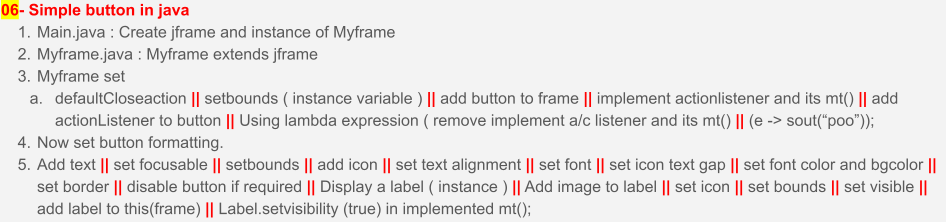 /* 06 - add simple buttons + display a label on click */
import javax.swing.BorderFactory;
import javax.swing.ImageIcon;
import javax.swing.JButton;
import javax.swing.JFrame;
import javax.swing.JLabel;
import javax.swing.JPanel;
import javax.swing.border.Border;
import java.awt.BorderLayout;
import java.awt.Color;
import java.awt.Container;
import java.awt.Font;
import java.awt.event.ActionEvent;
import java.awt.event.ActionListener;
public class Myframe extends JFrame implements ActionListener {
JButton bt1;
JLabel jl1;
Myframe(){
String userDir = System.getProperty("user.dir");
String imagePath = userDir + "/a3.png";
ImageIcon image = new ImageIcon(imagePath);
jl1 = new JLabel();
String imagePath1 = userDir + "/a2.png";
ImageIcon image1 = new ImageIcon(imagePath1);
jl1.setIcon(image1);
jl1.setBounds(100,210,250,100);
jl1.setBackground(Color.RED);
jl1.setOpaque(true);
jl1.setVisible(false);
bt1 = new JButton();
bt1.setBounds(100,100,250,100);
/*
lambda expression ,
remoeve implement action listener
and its method
bt1.addActionListener(e -> System.out.println("poo"));
*/
bt1.addActionListener(this);
// button formatting
bt1.setText("rajat");
bt1.setFocusable(false);
bt1.setIcon(image);
bt1.setHorizontalTextPosition(bt1.CENTER);
bt1.setVerticalTextPosition(bt1.BOTTOM);
bt1.setFont(new Font("Comic Sans",Font.BOLD,25));
bt1.setIconTextGap(-4);
bt1.setForeground(Color.CYAN);
bt1.setBackground(Color.BLUE);
bt1.setOpaque(true);
bt1.setBorder(BorderFactory.createEtchedBorder());
//bt1.setEnabled(false);
this.setDefaultCloseOperation(JFrame.EXIT_ON_CLOSE);
this.setLayout(null);
this.setSize(420,420);
this.setVisible(true);
this.add(bt1);
this.add(jl1);
}
@Override
public void actionPerformed(ActionEvent e) {
if(e.getSource()==bt1){
System.out.println("Poo");
jl1.setText("hi");
jl1.setVisible(true);
}
}
}
/* 06 - add simple buttons + display a label on click */
import javax.swing.BorderFactory;
import javax.swing.ImageIcon;
import javax.swing.JButton;
import javax.swing.JFrame;
import javax.swing.JLabel;
import javax.swing.JPanel;
import javax.swing.border.Border;
import java.awt.BorderLayout;
import java.awt.Color;
import java.awt.Container;
import java.awt.Font;
import java.awt.event.ActionEvent;
import java.awt.event.ActionListener;
public class Myframe extends JFrame implements ActionListener {
JButton bt1;
JLabel jl1;
Myframe(){
String userDir = System.getProperty("user.dir");
String imagePath = userDir + "/a3.png";
ImageIcon image = new ImageIcon(imagePath);
jl1 = new JLabel();
String imagePath1 = userDir + "/a2.png";
ImageIcon image1 = new ImageIcon(imagePath1);
jl1.setIcon(image1);
jl1.setBounds(100,210,250,100);
jl1.setBackground(Color.RED);
jl1.setOpaque(true);
jl1.setVisible(false);
bt1 = new JButton();
bt1.setBounds(100,100,250,100);
/*
lambda expression ,
remoeve implement action listener
and its method
bt1.addActionListener(e -> System.out.println("poo"));
*/
bt1.addActionListener(this);
// button formatting
bt1.setText("rajat");
bt1.setFocusable(false);
bt1.setIcon(image);
bt1.setHorizontalTextPosition(bt1.CENTER);
bt1.setVerticalTextPosition(bt1.BOTTOM);
bt1.setFont(new Font("Comic Sans",Font.BOLD,25));
bt1.setIconTextGap(-4);
bt1.setForeground(Color.CYAN);
bt1.setBackground(Color.BLUE);
bt1.setOpaque(true);
bt1.setBorder(BorderFactory.createEtchedBorder());
//bt1.setEnabled(false);
this.setDefaultCloseOperation(JFrame.EXIT_ON_CLOSE);
this.setLayout(null);
this.setSize(420,420);
this.setVisible(true);
this.add(bt1);
this.add(jl1);
}
@Override
public void actionPerformed(ActionEvent e) {
if(e.getSource()==bt1){
System.out.println("Poo");
jl1.setText("hi");
jl1.setVisible(true);
}
}
}
import javax.swing.BorderFactory; import javax.swing.ImageIcon; import javax.swing.JFrame; import javax.swing.JLabel; import javax.swing.JPanel; import javax.swing.border.Border; import java.awt.BorderLayout; import java.awt.Color; import java.awt.Container; import java.awt.Font; public class Main { public static void main(String[] args) { new Myframe(); } }
 /* 07-Border.Layout*/
import javax.swing.BorderFactory;
import javax.swing.ImageIcon;
import javax.swing.JFrame;
import javax.swing.JLabel;
import javax.swing.JPanel;
import javax.swing.border.Border;
import java.awt.BorderLayout;
import java.awt.Color;
import java.awt.Container;
import java.awt.Dimension;
import java.awt.Font;
public class Main {
public static void main(String[] args) {
JFrame jf1 = new JFrame();
jf1.setDefaultCloseOperation(JFrame.EXIT_ON_CLOSE);
jf1.setSize(420,420);
jf1.setLayout(new BorderLayout(10,10)); // need to add for panel(margin)
jf1.setVisible(true);
JPanel jp1 = new JPanel();
JPanel jp2 = new JPanel();
JPanel jp3 = new JPanel();
JPanel jp4 = new JPanel();
JPanel jp5 = new JPanel();
jp1.setBackground(Color.RED);
jp2.setBackground(Color.YELLOW);
jp3.setBackground(Color.GREEN);
jp4.setBackground(Color.GRAY);
jp5.setBackground(Color.ORANGE);
jp1.setPreferredSize(new Dimension(100,100)); // width, height
jp2.setPreferredSize(new Dimension(100,100));
jp3.setPreferredSize(new Dimension(100,100));
jp4.setPreferredSize(new Dimension(100,100));
jp5.setPreferredSize(new Dimension(100,100));
jf1.add(jp1,BorderLayout.NORTH);
jf1.add(jp2,BorderLayout.EAST);
jf1.add(jp3,BorderLayout.WEST);
jf1.add(jp4,BorderLayout.SOUTH);
jf1.add(jp5,BorderLayout.CENTER);
// - sub panel
JPanel jp6 = new JPanel();
JPanel jp7 = new JPanel();
JPanel jp8 = new JPanel();
JPanel jp9 = new JPanel();
JPanel jp10 = new JPanel();
jp6.setBackground(Color.DARK_GRAY);
jp7.setBackground(Color.LIGHT_GRAY);
jp8.setBackground(Color.PINK);
jp9.setBackground(Color.BLACK);
jp10.setBackground(Color.RED);
jp5.setLayout(new BorderLayout()); // need to add for panel(margin)
jp6.setPreferredSize(new Dimension(50,50)); // width, height
jp7.setPreferredSize(new Dimension(50,50));
jp8.setPreferredSize(new Dimension(50,50));
jp9.setPreferredSize(new Dimension(50,50));
jp10.setPreferredSize(new Dimension(50,50));
jp5.add(jp6,BorderLayout.NORTH);
jp5.add(jp7,BorderLayout.EAST);
jp5.add(jp8,BorderLayout.WEST);
jp5.add(jp9,BorderLayout.SOUTH);
jp5.add(jp10,BorderLayout.CENTER);
}
}
/* 07-Border.Layout*/
import javax.swing.BorderFactory;
import javax.swing.ImageIcon;
import javax.swing.JFrame;
import javax.swing.JLabel;
import javax.swing.JPanel;
import javax.swing.border.Border;
import java.awt.BorderLayout;
import java.awt.Color;
import java.awt.Container;
import java.awt.Dimension;
import java.awt.Font;
public class Main {
public static void main(String[] args) {
JFrame jf1 = new JFrame();
jf1.setDefaultCloseOperation(JFrame.EXIT_ON_CLOSE);
jf1.setSize(420,420);
jf1.setLayout(new BorderLayout(10,10)); // need to add for panel(margin)
jf1.setVisible(true);
JPanel jp1 = new JPanel();
JPanel jp2 = new JPanel();
JPanel jp3 = new JPanel();
JPanel jp4 = new JPanel();
JPanel jp5 = new JPanel();
jp1.setBackground(Color.RED);
jp2.setBackground(Color.YELLOW);
jp3.setBackground(Color.GREEN);
jp4.setBackground(Color.GRAY);
jp5.setBackground(Color.ORANGE);
jp1.setPreferredSize(new Dimension(100,100)); // width, height
jp2.setPreferredSize(new Dimension(100,100));
jp3.setPreferredSize(new Dimension(100,100));
jp4.setPreferredSize(new Dimension(100,100));
jp5.setPreferredSize(new Dimension(100,100));
jf1.add(jp1,BorderLayout.NORTH);
jf1.add(jp2,BorderLayout.EAST);
jf1.add(jp3,BorderLayout.WEST);
jf1.add(jp4,BorderLayout.SOUTH);
jf1.add(jp5,BorderLayout.CENTER);
// - sub panel
JPanel jp6 = new JPanel();
JPanel jp7 = new JPanel();
JPanel jp8 = new JPanel();
JPanel jp9 = new JPanel();
JPanel jp10 = new JPanel();
jp6.setBackground(Color.DARK_GRAY);
jp7.setBackground(Color.LIGHT_GRAY);
jp8.setBackground(Color.PINK);
jp9.setBackground(Color.BLACK);
jp10.setBackground(Color.RED);
jp5.setLayout(new BorderLayout()); // need to add for panel(margin)
jp6.setPreferredSize(new Dimension(50,50)); // width, height
jp7.setPreferredSize(new Dimension(50,50));
jp8.setPreferredSize(new Dimension(50,50));
jp9.setPreferredSize(new Dimension(50,50));
jp10.setPreferredSize(new Dimension(50,50));
jp5.add(jp6,BorderLayout.NORTH);
jp5.add(jp7,BorderLayout.EAST);
jp5.add(jp8,BorderLayout.WEST);
jp5.add(jp9,BorderLayout.SOUTH);
jp5.add(jp10,BorderLayout.CENTER);
}
}
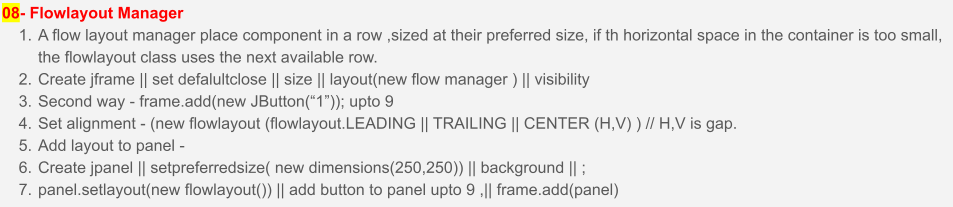 /* 08-A-FlowLayout.Button.&.Flowlayout.In.Jpanel*/
import javax.swing.JButton;
import javax.swing.JFrame;
import java.awt.FlowLayout;
public class Main {
public static void main(String[] args) {
JFrame jf1 = new JFrame();
jf1.setDefaultCloseOperation(JFrame.EXIT_ON_CLOSE);
jf1.setSize(420,420);
jf1.setLayout(new FlowLayout(FlowLayout.CENTER,1,1)); // need to add for panel(margin)
jf1.add(new JButton("1"));
jf1.add(new JButton("2"));
jf1.add(new JButton("3"));
jf1.add(new JButton("4"));
jf1.add(new JButton("5"));
jf1.add(new JButton("6"));
jf1.add(new JButton("7"));
jf1.add(new JButton("8"));
jf1.add(new JButton("9"));
jf1.setVisible(true);
}
}
/* 08-A-FlowLayout.Button.&.Flowlayout.In.Jpanel*/
import javax.swing.JButton;
import javax.swing.JFrame;
import java.awt.FlowLayout;
public class Main {
public static void main(String[] args) {
JFrame jf1 = new JFrame();
jf1.setDefaultCloseOperation(JFrame.EXIT_ON_CLOSE);
jf1.setSize(420,420);
jf1.setLayout(new FlowLayout(FlowLayout.CENTER,1,1)); // need to add for panel(margin)
jf1.add(new JButton("1"));
jf1.add(new JButton("2"));
jf1.add(new JButton("3"));
jf1.add(new JButton("4"));
jf1.add(new JButton("5"));
jf1.add(new JButton("6"));
jf1.add(new JButton("7"));
jf1.add(new JButton("8"));
jf1.add(new JButton("9"));
jf1.setVisible(true);
}
}
/* 08-B-FlowLayout.Button.&.Flowlayout.In.Jpanel*/ import javax.swing.JButton; import javax.swing.JFrame; import javax.swing.JPanel; import java.awt.Color; import java.awt.Dimension; import java.awt.FlowLayout; public class Main2 { public static void main(String[] args) { JFrame jf2 = new JFrame(); jf2.setDefaultCloseOperation(JFrame.EXIT_ON_CLOSE); jf2.setSize(420,420); jf2.setLayout(new FlowLayout(FlowLayout.CENTER,1,1)); // need to add for panel(margin) JPanel jp1 = new JPanel(); jp1.setPreferredSize(new Dimension(250,250)); jp1.setBackground(Color.MAGENTA); jp1.setLayout(new FlowLayout()); jp1.add(new JButton("1")); jp1.add(new JButton("2")); jp1.add(new JButton("3")); jp1.add(new JButton("4")); jp1.add(new JButton("5")); jp1.add(new JButton("6")); jp1.add(new JButton("7")); jp1.add(new JButton("8")); jp1.add(new JButton("9")); jf2.add(jp1); jf2.setVisible(true); } }
 /* 09-GridLayout*/
import javax.swing.JButton;
import javax.swing.JFrame;
import java.awt.GridLayout;
public class Main {
public static void main(String[] args) {
JFrame jf1 = new JFrame();
jf1.setDefaultCloseOperation(JFrame.EXIT_ON_CLOSE);
jf1.setSize(420,420);
/* different way */
jf1.setLayout(new GridLayout()); // default
jf1.setLayout(new GridLayout(9,1)); // row,column
jf1.setLayout(new GridLayout(3,3)); // row,column
jf1.setLayout(new GridLayout(3,3,2,2)); // gap
jf1.setLayout(new GridLayout(3,3)); // if 4 bttons, row,column
jf1.add(new JButton("1"));
jf1.add(new JButton("2"));
jf1.add(new JButton("3"));
jf1.add(new JButton("4"));
jf1.add(new JButton("5"));
jf1.add(new JButton("6"));
jf1.add(new JButton("7"));
jf1.add(new JButton("8"));
jf1.add(new JButton("9"));
jf1.add(new JButton("10"));
jf1.setVisible(true);
}
}
/* 09-GridLayout*/
import javax.swing.JButton;
import javax.swing.JFrame;
import java.awt.GridLayout;
public class Main {
public static void main(String[] args) {
JFrame jf1 = new JFrame();
jf1.setDefaultCloseOperation(JFrame.EXIT_ON_CLOSE);
jf1.setSize(420,420);
/* different way */
jf1.setLayout(new GridLayout()); // default
jf1.setLayout(new GridLayout(9,1)); // row,column
jf1.setLayout(new GridLayout(3,3)); // row,column
jf1.setLayout(new GridLayout(3,3,2,2)); // gap
jf1.setLayout(new GridLayout(3,3)); // if 4 bttons, row,column
jf1.add(new JButton("1"));
jf1.add(new JButton("2"));
jf1.add(new JButton("3"));
jf1.add(new JButton("4"));
jf1.add(new JButton("5"));
jf1.add(new JButton("6"));
jf1.add(new JButton("7"));
jf1.add(new JButton("8"));
jf1.add(new JButton("9"));
jf1.add(new JButton("10"));
jf1.setVisible(true);
}
}
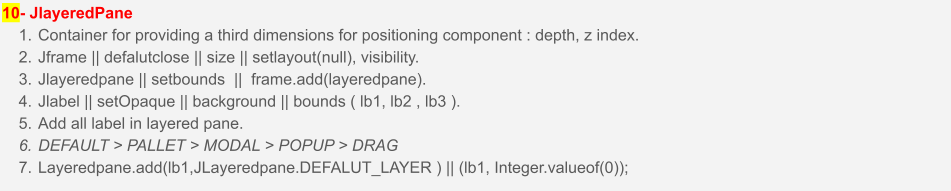 /* 10-layeredpane.with.label.example */
import javax.swing.JFrame;
import javax.swing.JLabel;
import javax.swing.JLayeredPane;
import java.awt.Color;
public class Main {
public static void main(String[] args) {
JFrame jf1 = new JFrame();
jf1.setDefaultCloseOperation(JFrame.EXIT_ON_CLOSE);
jf1.setSize(600,600);
JLayeredPane jlp1 = new JLayeredPane();
jlp1.setBounds(50, 50, 500, 500);
JLabel jl1 = new JLabel();
JLabel jl2 = new JLabel();
JLabel jl3 = new JLabel();
jl1.setOpaque(true);
jl1.setBackground(Color.BLUE);
jl1.setBounds(80,80,200,200);
jl2.setOpaque(true);
jl2.setBackground(Color.GREEN);
jl2.setBounds(100,100,200,200);
jl3.setOpaque(true);
jl3.setBackground(Color.YELLOW);
jl3.setBounds(120,120,200,200);
jlp1.add(jl1,JLayeredPane.DEFAULT_LAYER);
jlp1.add(jl2,JLayeredPane.PALETTE_LAYER);
jlp1.add(jl3,JLayeredPane.MODAL_LAYER);
jf1.add(jlp1);
jf1.setVisible(true);
}
}
/* 10-layeredpane.with.label.example */
import javax.swing.JFrame;
import javax.swing.JLabel;
import javax.swing.JLayeredPane;
import java.awt.Color;
public class Main {
public static void main(String[] args) {
JFrame jf1 = new JFrame();
jf1.setDefaultCloseOperation(JFrame.EXIT_ON_CLOSE);
jf1.setSize(600,600);
JLayeredPane jlp1 = new JLayeredPane();
jlp1.setBounds(50, 50, 500, 500);
JLabel jl1 = new JLabel();
JLabel jl2 = new JLabel();
JLabel jl3 = new JLabel();
jl1.setOpaque(true);
jl1.setBackground(Color.BLUE);
jl1.setBounds(80,80,200,200);
jl2.setOpaque(true);
jl2.setBackground(Color.GREEN);
jl2.setBounds(100,100,200,200);
jl3.setOpaque(true);
jl3.setBackground(Color.YELLOW);
jl3.setBounds(120,120,200,200);
jlp1.add(jl1,JLayeredPane.DEFAULT_LAYER);
jlp1.add(jl2,JLayeredPane.PALETTE_LAYER);
jlp1.add(jl3,JLayeredPane.MODAL_LAYER);
jf1.add(jlp1);
jf1.setVisible(true);
}
}
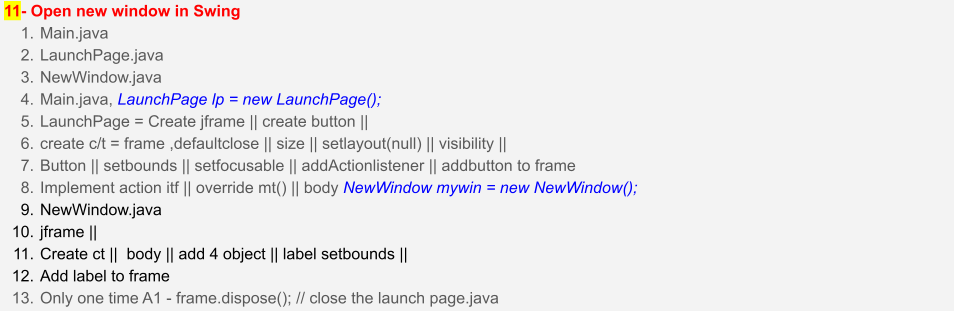 /* 11-Open.New.Window.In.Jswing */
public class Main {
public static void main(String[] args) {
new LaunchPage();
}
}
/* 11-Open.New.Window.In.Jswing */
public class Main {
public static void main(String[] args) {
new LaunchPage();
}
}
import java.awt.event.ActionEvent; import java.awt.event.ActionListener; import javax.swing.JButton; import javax.swing.JFrame; public class LaunchPage implements ActionListener{ JFrame jf = new JFrame(); JButton mybtn = new JButton("New Windows"); LaunchPage(){ jf.setDefaultCloseOperation(JFrame.EXIT_ON_CLOSE); jf.setSize(600,600); jf.setLayout(null); mybtn.setBounds(100,100,100,50); mybtn.setFocusable(false); mybtn.addActionListener(this); jf.add(mybtn); jf.setVisible(true); } public static void main(String[] args) { } @Override public void actionPerformed(ActionEvent e) { if(e.getSource()==mybtn){ System.out.println("hi.."); new NewWindow(); } } }
import java.awt.Color; import javax.swing.JFrame; import javax.swing.JLabel; public class NewWindow { JFrame myframe = new JFrame(); JLabel mylabel = new JLabel(); public NewWindow(){ myframe.setLayout(null); myframe.setBounds(500,0,500,500); myframe.setDefaultCloseOperation(JFrame.DISPOSE_ON_CLOSE); mylabel.setText("Hello"); mylabel.setBounds(0,50,100,100); mylabel.setOpaque(true); mylabel.setBackground(Color.RED); myframe.add(mylabel); myframe.setVisible(true); } public static void main(String[] args) { } }
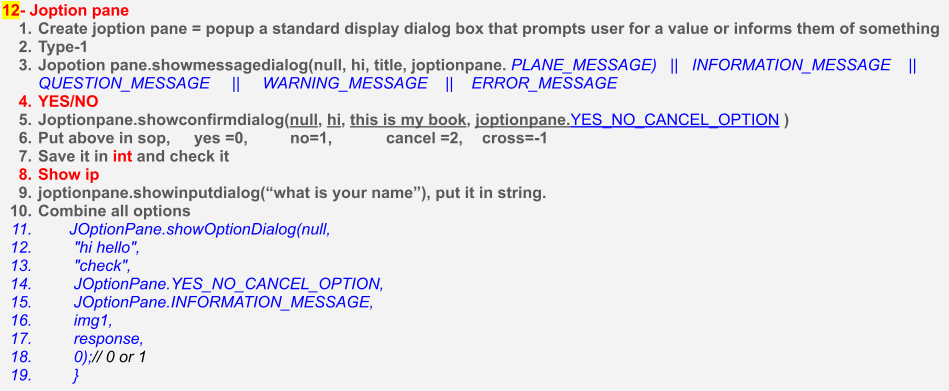 /* 12-JoptionPane.With.all.Options */
import javax.swing.ImageIcon;
import javax.swing.JOptionPane;
public class Main {
public static void main(String[] args) {
String userDir = System.getProperty("user.dir");
String imagePath = userDir + "/a3.png";
ImageIcon img1 = new ImageIcon(imagePath);
/* all possible options */
JOptionPane.showMessageDialog(null, "this is info", "title", JOptionPane.PLAIN_MESSAGE);
JOptionPane.showMessageDialog(null, "question info", "title", JOptionPane.QUESTION_MESSAGE);
JOptionPane.showMessageDialog(null, "error info", "title", JOptionPane.INFORMATION_MESSAGE);
JOptionPane.showMessageDialog(null, "warning info", "title", JOptionPane.WARNING_MESSAGE);
JOptionPane.showMessageDialog(null, "error info", "title", JOptionPane.ERROR_MESSAGE);
/* yes no question */
JOptionPane.showConfirmDialog(null, "hello", "confirm", JOptionPane.YES_NO_CANCEL_OPTION);
// above in sop , yes=0, no=1, cancel=2, cross=-1
/* show i/p */
String name = JOptionPane.showInputDialog("what is your name");
System.out.println(name);
String [] response ={"no you are good","thank you","blush"};
JOptionPane.showOptionDialog(null,
"hi hello",
"check",
JOptionPane.YES_NO_CANCEL_OPTION,
JOptionPane.INFORMATION_MESSAGE,
img1,
response,
0);
}
}
/* 12-JoptionPane.With.all.Options */
import javax.swing.ImageIcon;
import javax.swing.JOptionPane;
public class Main {
public static void main(String[] args) {
String userDir = System.getProperty("user.dir");
String imagePath = userDir + "/a3.png";
ImageIcon img1 = new ImageIcon(imagePath);
/* all possible options */
JOptionPane.showMessageDialog(null, "this is info", "title", JOptionPane.PLAIN_MESSAGE);
JOptionPane.showMessageDialog(null, "question info", "title", JOptionPane.QUESTION_MESSAGE);
JOptionPane.showMessageDialog(null, "error info", "title", JOptionPane.INFORMATION_MESSAGE);
JOptionPane.showMessageDialog(null, "warning info", "title", JOptionPane.WARNING_MESSAGE);
JOptionPane.showMessageDialog(null, "error info", "title", JOptionPane.ERROR_MESSAGE);
/* yes no question */
JOptionPane.showConfirmDialog(null, "hello", "confirm", JOptionPane.YES_NO_CANCEL_OPTION);
// above in sop , yes=0, no=1, cancel=2, cross=-1
/* show i/p */
String name = JOptionPane.showInputDialog("what is your name");
System.out.println(name);
String [] response ={"no you are good","thank you","blush"};
JOptionPane.showOptionDialog(null,
"hi hello",
"check",
JOptionPane.YES_NO_CANCEL_OPTION,
JOptionPane.INFORMATION_MESSAGE,
img1,
response,
0);
}
}
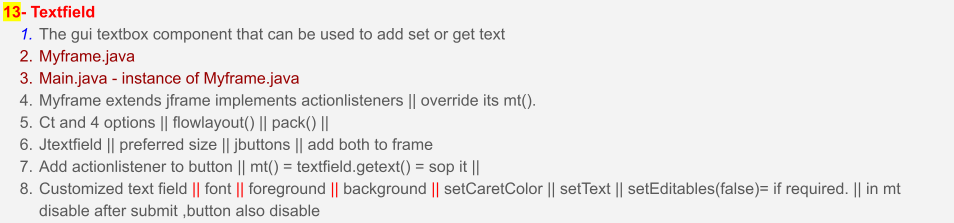 /* 13-Text.Field.With.Submit.Button */
import javax.swing.ImageIcon;
import javax.swing.JOptionPane;
public class Main {
public static void main(String[] args) {
new MyFrame();
}
}
/* 13-Text.Field.With.Submit.Button */
import javax.swing.ImageIcon;
import javax.swing.JOptionPane;
public class Main {
public static void main(String[] args) {
new MyFrame();
}
}
import java.awt.Color; import java.awt.Dimension; import java.awt.Event; import java.awt.FlowLayout; import java.awt.Font; import java.awt.event.ActionEvent; import java.awt.event.ActionListener; import javax.swing.JButton; import javax.swing.JFrame; import javax.swing.JLabel; import javax.swing.JTextField; public class MyFrame extends JFrame implements ActionListener{ JTextField textField; JButton button; public MyFrame(){ this.setDefaultCloseOperation(JFrame.EXIT_ON_CLOSE); this.setLayout(new FlowLayout()); button = new JButton("Submit"); button.addActionListener(this); textField = new JTextField(); textField.setPreferredSize(new Dimension(250,40)); textField.setFont(new Font("Arial",0,35)); textField.setForeground(Color.GREEN); textField.setBackground(Color.BLACK); textField.setCaretColor(Color.RED); textField.setText("enter your name"); this.add(button); this.add(textField); this.pack(); this.setVisible(true); } @Override public void actionPerformed(ActionEvent e) { if(e.getSource()==button){ System.out.println(textField.getText()); } textField.setEditable(false); button.setEnabled(false); } }
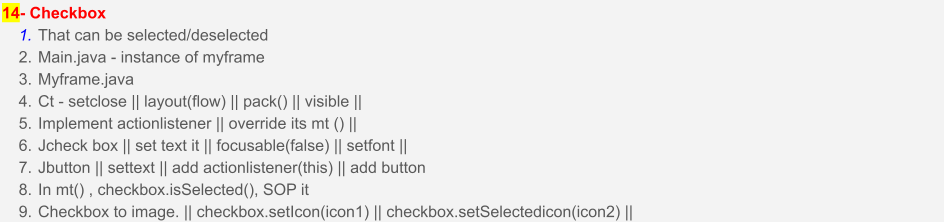 /* 14 - check.box.with.image */
import javax.swing.ImageIcon;
import javax.swing.JOptionPane;
public class Main {
public static void main(String[] args) {
new MyFrame();
}
}
/* 14 - check.box.with.image */
import javax.swing.ImageIcon;
import javax.swing.JOptionPane;
public class Main {
public static void main(String[] args) {
new MyFrame();
}
}
import java.awt.Color; import java.awt.Dimension; import java.awt.Event; import java.awt.FlowLayout; import java.awt.Font; import java.awt.event.ActionEvent; import java.awt.event.ActionListener; import javax.swing.ImageIcon; import javax.swing.JButton; import javax.swing.JCheckBox; import javax.swing.JFrame; import javax.swing.JLabel; import javax.swing.JTextField; public class MyFrame extends JFrame implements ActionListener{ JButton button; JCheckBox checkBox; ImageIcon image1; ImageIcon image2; public MyFrame(){ this.setDefaultCloseOperation(JFrame.EXIT_ON_CLOSE); this.setLayout(new FlowLayout()); String userDir = System.getProperty("user.dir"); System.out.println("this is =="+userDir); String imagePath1 = userDir + "/tick.png"; String imagePath2 = userDir + "/cross.png"; image1 = new ImageIcon(imagePath1); image2 = new ImageIcon(imagePath2); checkBox = new JCheckBox(); checkBox.setText("I am not a robot "); button = new JButton("Submit"); button.addActionListener(this); checkBox.setFocusable(false); checkBox.setFont(new Font("Arial",Font.PLAIN,15)); /* set icon to the check box*/ checkBox.setIcon(image1); checkBox.setSelectedIcon(image2); this.add(button); this.add(checkBox); this.pack(); this.setVisible(true); } @Override public void actionPerformed(ActionEvent e) { if(e.getSource()==button){ System.out.println(checkBox.isSelected()); } } }
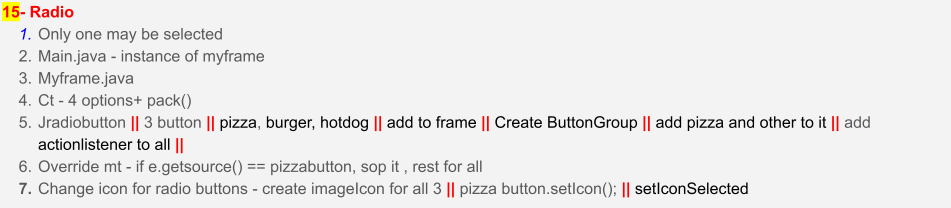 /* 15-Radio.buttons.with.image.and.text */
import javax.swing.ImageIcon;
import javax.swing.JOptionPane;
public class Main {
public static void main(String[] args) {
new MyFrame();
}
}
/* 15-Radio.buttons.with.image.and.text */
import javax.swing.ImageIcon;
import javax.swing.JOptionPane;
public class Main {
public static void main(String[] args) {
new MyFrame();
}
}
import java.awt.Color; import java.awt.Dimension; import java.awt.Event; import java.awt.FlowLayout; import java.awt.Font; import java.awt.event.ActionEvent; import java.awt.event.ActionListener; import javax.swing.ButtonGroup; import javax.swing.ImageIcon; import javax.swing.JButton; import javax.swing.JCheckBox; import javax.swing.JFrame; import javax.swing.JLabel; import javax.swing.JRadioButton; import javax.swing.JTextField; public class MyFrame extends JFrame implements ActionListener{ JButton button; JRadioButton radio1, radio2, radio3; JLabel label; ImageIcon image1; ImageIcon image2; ImageIcon image3; public MyFrame(){ this.setDefaultCloseOperation(JFrame.EXIT_ON_CLOSE); this.setLayout(new FlowLayout()); /* label */ label = new JLabel("No order is placed"); /* image code for mac os */ String userDir = System.getProperty("user.dir"); String imagePath1 = userDir + "/xpizza.png"; String imagePath2 = userDir + "/xhotdog.png"; String imagePath3 = userDir + "/xburger.png"; /* set image to imageicon */ image1 = new ImageIcon(imagePath1); image2 = new ImageIcon(imagePath2); image3 = new ImageIcon(imagePath3); /* jRadioButton */ radio1 = new JRadioButton("pizza"); radio2 = new JRadioButton("ham burger"); radio3 = new JRadioButton("hotdog"); /* image Radio Buttons*/ radio1.setIcon(image1); radio2.setIcon(image2); radio3.setIcon(image3); /* add actionlistener */ radio1.addActionListener(this); radio2.addActionListener(this); radio3.addActionListener(this); ButtonGroup btnG = new ButtonGroup(); btnG.add(radio1); btnG.add(radio2); btnG.add(radio3); /* add all component to jframe */ this.add(label); this.add(radio1); this.add(radio2); this.add(radio3); this.pack(); this.setVisible(true); } @Override public void actionPerformed(ActionEvent e) { if(e.getSource()==radio1){ System.out.println("pizza order"); label.setText("PIZZA ORDERED"); } else if(e.getSource()==radio2){ System.out.println("ham burger order"); label.setText("BURGER ORDERED"); } else{ System.out.println("hotdog order"); label.setText("HOTDOG ORDERED"); } } }
 /* 16- JcomboBox.and.its.Method */
// jslider
import javax.swing.ImageIcon;
import javax.swing.JOptionPane;
public class Main {
public static void main(String[] args) {
new MyFrame();
}
}
/* 16- JcomboBox.and.its.Method */
// jslider
import javax.swing.ImageIcon;
import javax.swing.JOptionPane;
public class Main {
public static void main(String[] args) {
new MyFrame();
}
}
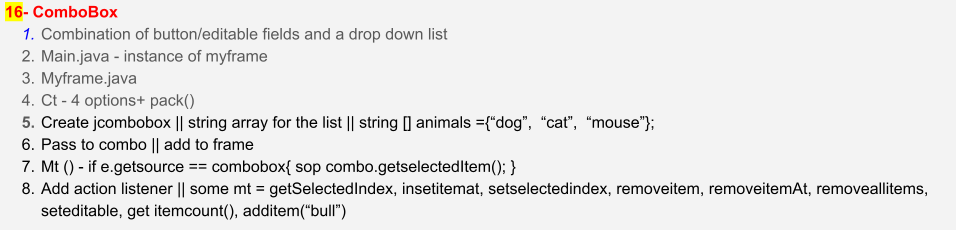
// Myframe.java import java.awt.FlowLayout; import java.awt.event.ActionEvent; import java.awt.event.ActionListener; import javax.swing.ImageIcon; import javax.swing.JButton; import javax.swing.JComboBox; import javax.swing.JFrame; import javax.swing.JLabel; public class MyFrame extends JFrame implements ActionListener{ JButton button; JLabel label1,label2; ImageIcon image1; ImageIcon image2; ImageIcon image3; JComboBox<String> combo; public MyFrame(){ this.setDefaultCloseOperation(JFrame.EXIT_ON_CLOSE); this.setLayout(new FlowLayout()); /* list for combo box */ String[] animals = {"dog","elephant","tiger","monkey","horse","cat","mouse"}; /* label */ label1 = new JLabel("SELECT ANIMAL"); label2 = new JLabel(); /* image code for mac os */ String userDir = System.getProperty("user.dir"); String imagePath1 = userDir + "/xpizza.png"; String imagePath2 = userDir + "/xhotdog.png"; String imagePath3 = userDir + "/xburger.png"; /* set image to imageicon */ image1 = new ImageIcon(imagePath1); image2 = new ImageIcon(imagePath2); image3 = new ImageIcon(imagePath3); /* Jcombo box */ combo = new JComboBox<>(animals); combo.addActionListener(this); /* comba method insert item */ combo.insertItemAt("DOG", 0); combo.setSelectedIndex(3); combo.removeItem("dog"); combo.removeItemAt(3); combo.removeAllItems(); combo.setEditable(true); combo.getItemCount(); combo.addItem("cow"); /* add all component to jframe */ this.add(label1); this.add(combo); this.add(label2); this.pack(); this.setVisible(true); } @Override public void actionPerformed(ActionEvent e) { if(e.getSource()==combo){ System.out.println(combo.getSelectedItem()); System.out.println(combo.getSelectedIndex()); } } }
 /* 17 - Jslider */
import javax.swing.ImageIcon;
import javax.swing.JOptionPane;
public class Main {
public static void main(String[] args) {
new MyFrame();
}
}
/* 17 - Jslider */
import javax.swing.ImageIcon;
import javax.swing.JOptionPane;
public class Main {
public static void main(String[] args) {
new MyFrame();
}
}
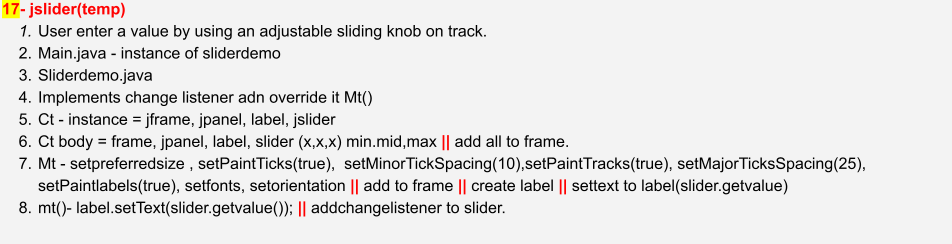
//Myframe.java import java.awt.Dimension; import java.awt.FlowLayout; import java.awt.Font; import javax.swing.JFrame; import javax.swing.JLabel; import javax.swing.JPanel; import javax.swing.JSlider; import javax.swing.SwingConstants; import javax.swing.event.ChangeEvent; import javax.swing.event.ChangeListener; public class MyFrame extends JFrame implements ChangeListener{ JSlider jslide; JLabel label1; JPanel panel; public MyFrame(){ this.setDefaultCloseOperation(JFrame.EXIT_ON_CLOSE); this.setLayout(new FlowLayout()); /* label */ label1 = new JLabel("Blank"); jslide = new JSlider(0,100,50);//min,max,starting point panel = new JPanel(); jslide.setPreferredSize(new Dimension(200,200)); /* jslide methods */ jslide.setPaintTicks(true); jslide.setMinorTickSpacing(10); jslide.setPaintTrack(true); jslide.setMajorTickSpacing(25); jslide.setPaintLabels(true); jslide.setFont(new Font("Arial",Font.PLAIN,20)); jslide.setOrientation(SwingConstants.VERTICAL); jslide.addChangeListener(this); /* add all component to jframe */ this.add(label1); this.add(jslide); this.add(panel); this.pack(); this.setVisible(true); } @Override public void stateChanged(ChangeEvent e) { int value = jslide.getValue(); System.out.println(value); } }
 /* 18-Progress.Bar */
public class Main {
public static void main(String[] args) {
new MyFrame();
}
}
/* 18-Progress.Bar */
public class Main {
public static void main(String[] args) {
new MyFrame();
}
}
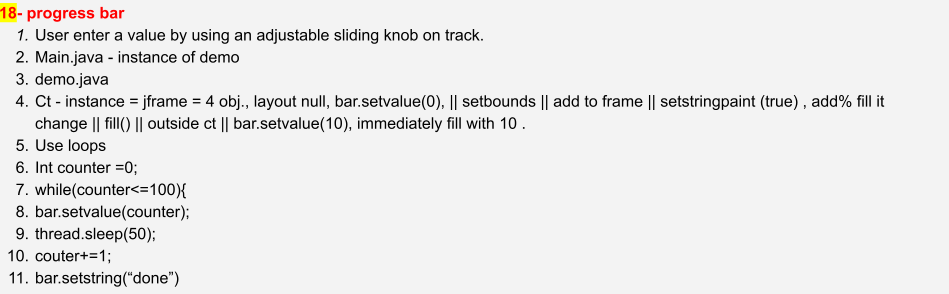
// new window import javax.swing.JFrame; import javax.swing.JProgressBar; public class MyFrame extends JFrame { JProgressBar pbar ; public MyFrame(){ pbar = new JProgressBar(); pbar.setValue(0); pbar.setBounds(0,0,420,50); pbar.setStringPainted(true); this.setDefaultCloseOperation(JFrame.EXIT_ON_CLOSE); this.setLayout(null); this.setSize(420,420); /* add all component to jframe */ this.add(pbar); this.setVisible(true); fill(); } private void fill() { int counter =0; while(counter<=100){ pbar.setValue(counter); try { Thread.sleep(50); } catch (InterruptedException e) { e.printStackTrace(); } counter+=1; } pbar.setString("100 done"); } }
 /* 19-Jmenu.Bar */
public class Main {
public static void main(String[] args) {
new MyFrame();
}
}
/* 19-Jmenu.Bar */
public class Main {
public static void main(String[] args) {
new MyFrame();
}
}
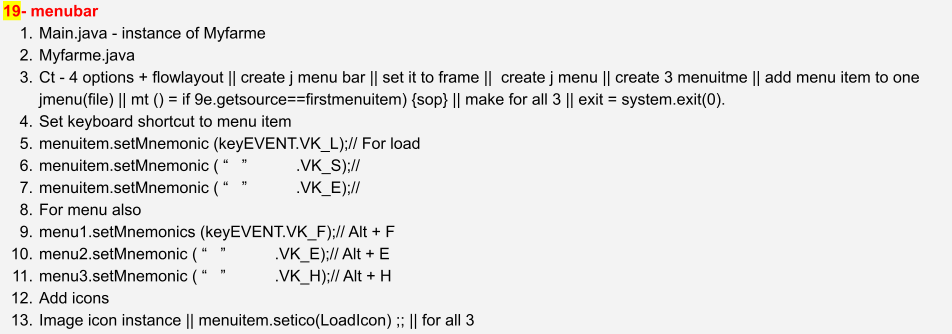
// new window import java.awt.FlowLayout; import java.awt.event.ActionEvent; import java.awt.event.ActionListener; import java.awt.event.KeyEvent; import javax.swing.ImageIcon; import javax.swing.JFrame; import javax.swing.JMenu; import javax.swing.JMenuBar; import javax.swing.JMenuItem; public class MyFrame extends JFrame implements ActionListener{ JMenuBar mbar; JMenu menu1,menu2,menu3; JMenuItem jitem1, jitem2, jitem3; String userDir = System.getProperty("user.dir"); String imagePath1 = userDir + "/zsave.png"; String imagePath2 = userDir + "/zload.png"; String imagePath3 = userDir + "/zexit.png"; ImageIcon image1 = new ImageIcon(imagePath1); ImageIcon image2 = new ImageIcon(imagePath2); ImageIcon image3 = new ImageIcon(imagePath3); public MyFrame(){ this.setDefaultCloseOperation(JFrame.EXIT_ON_CLOSE); this.setLayout(new FlowLayout()); this.setSize(500,500); /* create menubar */ JMenuBar mbar = new JMenuBar(); /* create menu */ menu1 = new JMenu("File"); menu2 = new JMenu("Edit"); menu3 = new JMenu("Help"); /* add menu to bar */ mbar.add(menu1); mbar.add(menu2); mbar.add(menu3); /* set mbar to frame */ this.setJMenuBar(mbar); this.setVisible(true); /* create menuitem */ jitem1 = new JMenuItem("Load"); jitem2 = new JMenuItem("Save"); jitem3 = new JMenuItem("Exit"); /* add menuitem to menu */ menu1.add(jitem1); menu1.add(jitem2); menu1.add(jitem3); /* add action listener */ jitem1.addActionListener(this); jitem2.addActionListener(this); jitem3.addActionListener(this); /* set keyboard shortcuts to menuitem */ jitem1.setMnemonic(KeyEvent.VK_L); jitem2.setMnemonic(KeyEvent.VK_S); jitem3.setMnemonic(KeyEvent.VK_E); /* set keyboard shortcuts to menuitem */ menu1.setMnemonic(KeyEvent.VK_F); menu2.setMnemonic(KeyEvent.VK_E); menu3.setMnemonic(KeyEvent.VK_H); /* set image icons */ jitem1.setIcon(image1); jitem2.setIcon(image2); jitem3.setIcon(image3); this.setVisible(true); } @Override public void actionPerformed(ActionEvent e) { if(e.getSource()==jitem1){ System.out.println("file is being load"); } if(e.getSource()==jitem2){ System.out.println("file is being save"); } if(e.getSource()==jitem3){ System.out.println("saving progress and closing "); try { Thread.sleep(100); } catch (InterruptedException e1) { // TODO Auto-generated catch block e1.printStackTrace(); } System.exit(0); } } }
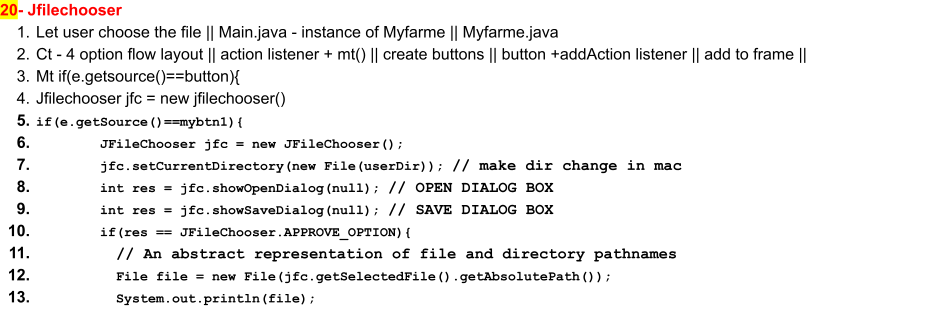 /* 20-JfileChooser */
// jfilechooser
public class Main {
public static void main(String[] args) {
new MyFrame();
}
}
/* 20-JfileChooser */
// jfilechooser
public class Main {
public static void main(String[] args) {
new MyFrame();
}
}
// new window import java.awt.FlowLayout; import java.awt.event.ActionEvent; import java.awt.event.ActionListener; import java.awt.event.KeyEvent; import java.io.File; import javax.swing.JButton; import javax.swing.JFileChooser; import javax.swing.JFrame; public class MyFrame extends JFrame implements ActionListener{ String userDir = System.getProperty("user.dir"); JButton mybtn1; public MyFrame(){ this.setDefaultCloseOperation(JFrame.EXIT_ON_CLOSE); this.setLayout(new FlowLayout()); this.setSize(500,500); mybtn1 = new JButton("OPEN/SAVE - FILE"); mybtn1.addActionListener(this); this.add(mybtn1); this.setVisible(true); } @Override public void actionPerformed(ActionEvent e) { if(e.getSource()==mybtn1){ JFileChooser jfc = new JFileChooser(); jfc.setCurrentDirectory(new File(userDir)); // make dir change in mac /* open */ // System.out.println(jfc.showOpenDialog(null)); // 1 = Cancel, 0 = Select int res = jfc.showOpenDialog(null); // OPEN DIALOG BOX int res = jfc.showSaveDialog(null); // SAVE DIALOG BOX if(res == JFileChooser.APPROVE_OPTION){ // An abstract representation of file and directory pathnames File file = new File(jfc.getSelectedFile().getAbsolutePath()); System.out.println(file); } } } }
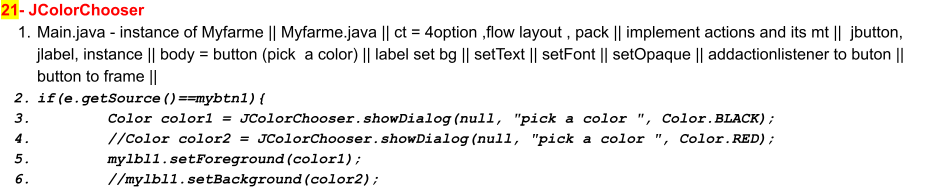 /* 21-Jcolor.Chooser */
// jcolorchooser
public class Main {
public static void main(String[] args) {
new MyFrame();
}
}
/* 21-Jcolor.Chooser */
// jcolorchooser
public class Main {
public static void main(String[] args) {
new MyFrame();
}
}
// new window import java.awt.Color; import java.awt.FlowLayout; import java.awt.Font; import java.awt.event.ActionEvent; import java.awt.event.ActionListener; import java.awt.event.KeyEvent; import java.io.File; import javax.swing.JButton; import javax.swing.JColorChooser; import javax.swing.JFileChooser; import javax.swing.JFrame; import javax.swing.JLabel; public class MyFrame extends JFrame implements ActionListener{ String userDir = System.getProperty("user.dir"); JButton mybtn1; JLabel mylbl1; public MyFrame(){ this.setDefaultCloseOperation(JFrame.EXIT_ON_CLOSE); this.setLayout(new FlowLayout()); this.setSize(500,500); mylbl1 = new JLabel(); mylbl1.setText("I M The Best Coder: RAJAT "); mylbl1.setBackground(Color.BLACK); mylbl1.setForeground(Color.GREEN); mylbl1.setFont(new Font("Arial", 2, 24)); mylbl1.setOpaque(true); mybtn1 = new JButton("Choose Font Color"); mybtn1.addActionListener(this); this.add(mylbl1); this.add(mybtn1); this.pack(); this.setVisible(true); } @Override public void actionPerformed(ActionEvent e) { if(e.getSource()==mybtn1){ Color color1 = JColorChooser.showDialog(null, "pick a color ", Color.BLACK); //Color color2 = JColorChooser.showDialog(null, "pick a color ", Color.RED); mylbl1.setForeground(color1); //mylbl1.setBackground(color2); } } }
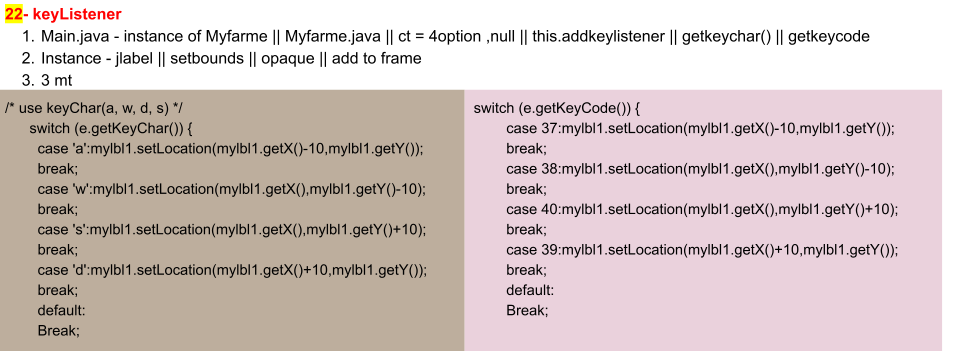 /* 22-keyListener */
// Key-Listener, using getKeychar, getKeyCode
public class Main {
public static void main(String[] args) {
new MyFrame();
}
}
/* 22-keyListener */
// Key-Listener, using getKeychar, getKeyCode
public class Main {
public static void main(String[] args) {
new MyFrame();
}
}
// new window import java.awt.Color; import java.awt.event.KeyEvent; import java.awt.event.KeyListener; import javax.swing.JFrame; import javax.swing.JLabel; public class MyFrame extends JFrame implements KeyListener{ //String userDir = System.getProperty("user.dir"); JLabel mylbl1; public MyFrame(){ this.setDefaultCloseOperation(JFrame.EXIT_ON_CLOSE); this.setLayout(null); this.setSize(500,500); this.addKeyListener(this); mylbl1 = new JLabel(); mylbl1.setBackground(Color.BLACK); mylbl1.setForeground(Color.GREEN); mylbl1.setOpaque(true); mylbl1.setBounds(0,0,100,100); mylbl1.addKeyListener(this); this.add(mylbl1); this.setVisible(true); } @Override public void keyTyped(KeyEvent e) { /* use keyChar(a, w, d, s) */ switch (e.getKeyChar()) { case 'a':mylbl1.setLocation(mylbl1.getX()-10,mylbl1.getY()); break; case 'w':mylbl1.setLocation(mylbl1.getX(),mylbl1.getY()-10); break; case 's':mylbl1.setLocation(mylbl1.getX(),mylbl1.getY()+10); break; case 'd':mylbl1.setLocation(mylbl1.getX()+10,mylbl1.getY()); break; default: break; } } @Override public void keyPressed(KeyEvent e) { /* use keyCode works here (37,38,39,40 = up,down,left,right) */ switch (e.getKeyCode()) { case 37:mylbl1.setLocation(mylbl1.getX()-10,mylbl1.getY()); break; case 38:mylbl1.setLocation(mylbl1.getX(),mylbl1.getY()-10); break; case 40:mylbl1.setLocation(mylbl1.getX(),mylbl1.getY()+10); break; case 39:mylbl1.setLocation(mylbl1.getX()+10,mylbl1.getY()); break; default: break; } } @Override public void keyReleased(KeyEvent e) { System.out.println("keycode = "+e.getKeyCode()); } }
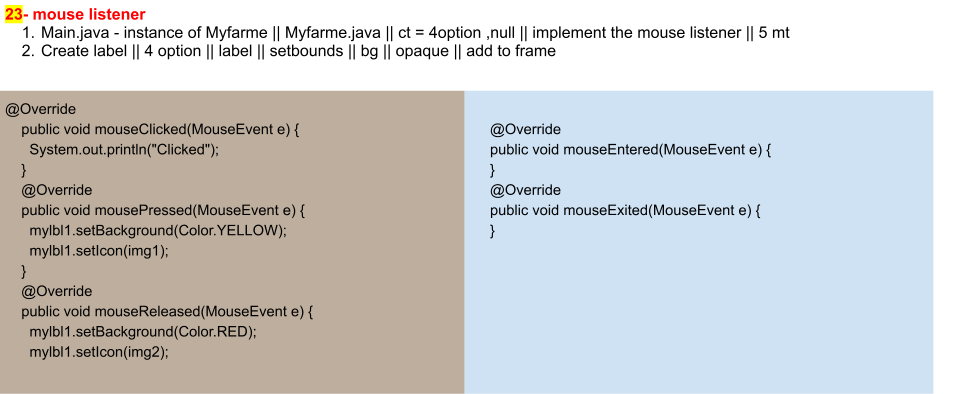 /* 23-MouseListener */
// mouse listener
public class Main {
public static void main(String[] args) {
new MyFrame();
}
}
/* 23-MouseListener */
// mouse listener
public class Main {
public static void main(String[] args) {
new MyFrame();
}
}
// new window import java.awt.Color; import java.awt.event.KeyEvent; import java.awt.event.KeyListener; import java.awt.event.MouseEvent; import java.awt.event.MouseListener; import javax.swing.ImageIcon; import javax.swing.JFrame; import javax.swing.JLabel; public class MyFrame extends JFrame implements MouseListener{ String userDir = System.getProperty("user.dir"); String mypic1 = userDir+"/c1.png"; String mypic2 = userDir+"/c2.png"; ImageIcon img1 = new ImageIcon(mypic1); ImageIcon img2 = new ImageIcon(mypic2); JLabel mylbl1; public MyFrame(){ this.setDefaultCloseOperation(JFrame.EXIT_ON_CLOSE); this.setLayout(null); this.setSize(500,500); mylbl1 = new JLabel(); mylbl1.setBackground(Color.WHITE); mylbl1.setOpaque(true); mylbl1.setBounds(125,125,240,240); mylbl1.addMouseListener(this); mylbl1.setIcon(img2); this.add(mylbl1); this.setVisible(true); } @Override public void mouseClicked(MouseEvent e) { System.out.println("Clicked"); } @Override public void mousePressed(MouseEvent e) { mylbl1.setBackground(Color.YELLOW); mylbl1.setIcon(img1); } @Override public void mouseReleased(MouseEvent e) { mylbl1.setBackground(Color.RED); mylbl1.setIcon(img2); } @Override public void mouseEntered(MouseEvent e) { } @Override public void mouseExited(MouseEvent e) { } }